Claude Code Status Line: Live Usage, Context & Reset Timers
A custom Claude Code status line with context usage, plan limits, reset countdowns and colour-coded bars, plus a safe install and uninstall guide.
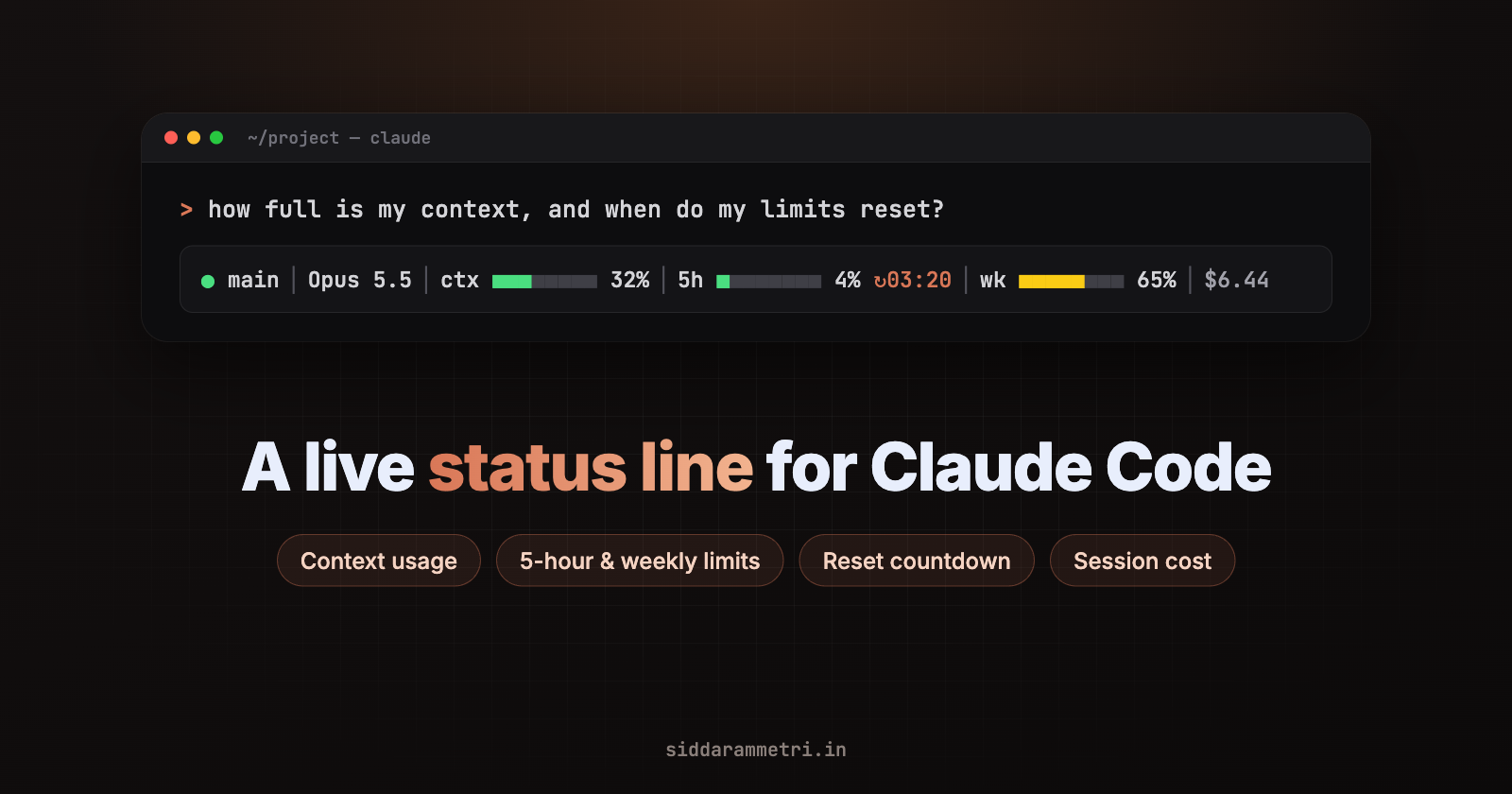
When I work in Claude Code, I keep asking the same questions: how full is this conversation, how much of my 5-hour and weekly limit have I used, and when does it reset? Built-in commands answer each one, but only when I stop and run them. I wanted the answers on screen all the time, next to the model, the git branch and the session's estimated cost.
Claude Code supports this through its status line, a row at the bottom of the terminal that shows whatever a script of yours prints. This post covers the status line I use every day: what it shows, how to install it safely, how it works, the design mistakes I made building it, and how to remove it again.
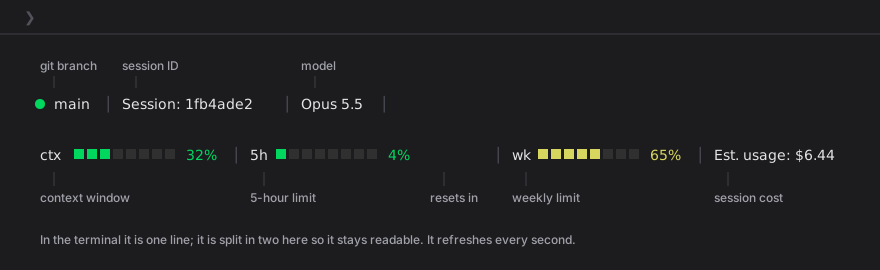
The finished status line. In the terminal it's one row; it's split in two here so the labels fit.
Shortcut: let Claude Code do it for you
Use Claude Code? Open the original post and click Copy Claude Code prompt. Paste it into Claude Code and it does the setup for you: it downloads the installer, tells you what it will change and asks before running it.
Not using Claude Code? Follow the steps below by hand.
What the status line shows
● main │ Session: 1fb4ade2 │ Opus 5.5 │ ctx ■■■□□□□□ 32% │ 5h ■□□□□□□□ 4% ↻03:20 │ wk ■■■■■□□□ 65% │ Est. usage: $6.44
| Segment | What it is | Where it comes from |
|---|---|---|
● main |
Git branch, or the folder name outside a repo | Read locally with git on every run |
Session: 1fb4ade2 |
First 8 characters of the session ID | session_id |
Opus 5.5 |
The current model | model.display_name |
ctx bar |
How full the conversation's context window is | context_window.used_percentage |
5h bar + ↻03:20 |
Use of your 5-hour limit, and the time until it resets | rate_limits.five_hour |
wk bar |
Use of your weekly (7-day) limit | rate_limits.seven_day |
Est. usage |
Estimated cost of this session in US dollars | cost.total_cost_usd |
Each bar is 8 squares; the filled part is coloured and the rest stays dark grey (shown as □ above).
Not every value is equally fresh:
Live, worked out on your machine: the git branch, the
↻countdown (your clock compared with the reset time) and the animation.Updated when Claude Code gets a new response: the
ctx,5handwkpercentages and the cost. The script redraws every second, but these numbers only change when Claude Code itself receives new data.An estimate:
Est. usageis computed by Claude Code at list price and resets to $0 when/clearstarts a new session. It may differ from your actual bill, and on a Pro or Max plan it isn't a charge at all.Sometimes unavailable: if a field is missing, its segment is simply left out. Nothing is guessed.
Prerequisites and compatibility
Claude Code with status line support. I built and tested this with Claude Code 2.1.292 on macOS (Apple Terminal).
bash, plus
jqorpython3(the installer uses one of them to edit your settings, and the script uses one to read Claude Code's data). Check withwhich jq python3.git (optional) for the branch segment.
A terminal with 256-colour support. Almost every modern terminal has it.
For the
5handwkbars: a Claude.ai Pro or Max subscription. Claude Code only sends the 5-hour and weekly limits to Pro and Max subscribers, and only after the first API response in a session. With an API key, Amazon Bedrock or Google Vertex, those two segments don't appear; the rest still works.
It's written for macOS and Linux. I've only tested it on macOS. On Windows, Claude Code runs status line commands through Git Bash or PowerShell; this bash script may work under Git Bash, but I haven't tested it.
Optional: make the terminal nicer for prompts
This is separate from the status line, but it's the first thing I set up. Run this inside Claude Code:
/terminal-setup
What it does depends on your terminal:
| Terminal | What /terminal-setup changes |
|---|---|
| Apple Terminal (macOS) | Turns on "Use Option as Meta Key" and turns off the audible bell (the bell is left on in screen reader mode) |
| iTerm2 | Lets terminal apps access the clipboard, so /copy works (restart iTerm2 afterwards) |
| VS Code, Cursor, Devin Desktop, Alacritty before 0.16, Zed | Adds a Shift+Enter key binding for new lines. In VS Code, Cursor and Devin Desktop it also turns off the integrated terminal's GPU acceleration and adjusts scroll sensitivity |
If you accepted Claude Code's terminal setup prompt on first run, this has already been done. With Option as Meta, these shortcuts work:
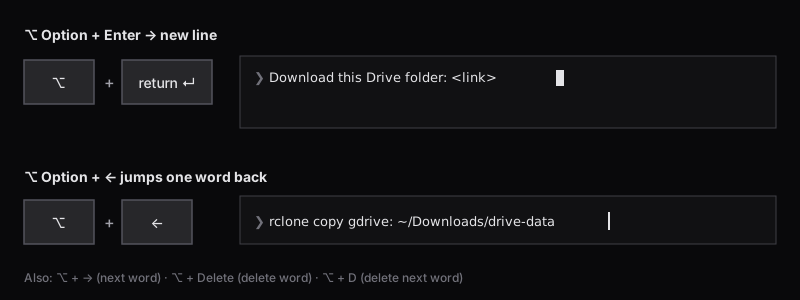
Option+Enter for a new line, Option+Arrow to move by word.
| Keys | Action |
|---|---|
⌥ + Enter |
New line inside your message |
⌥ + ← / ⌥ + → |
Jump back / forward one word |
⌥ + Delete |
Delete the previous word |
⌥ + D |
Delete the next word |
In any terminal, Ctrl+J or typing \ then Enter also adds a new line, and Shift+Enter already works in Apple Terminal, iTerm2 and several others without setup.
Trade-off: with Option as Meta, Option no longer types characters like ©, € or ñ in Terminal. To undo it, untick Terminal → Settings → Profiles → Keyboard → "Use Option as Meta Key".
Install
The installer is a single bash file. Download it, read it, then run it:
curl -fsSL https://siddarammetri.in/blog/claude-code-status-line/install.sh \
  -o /tmp/statusline-install.sh
less /tmp/statusline-install.sh   # read it first (q to quit)
bash /tmp/statusline-install.sh
Read scripts before you run them. Don't pipe
curlstraight intobash, for this installer or any other. The file is short, and the top of it lists exactly what it changes.
It makes exactly these changes, and nothing else:
| File | Change | Backup |
|---|---|---|
~/.claude/statusline-command.sh |
Written (replaced if it already exists) and made executable | An existing file is copied to statusline-command.sh.bak-<date-time> first |
~/.claude/settings.json |
Created if missing. Its statusLine entry is set to run the script every second; a statusLine you already had is replaced. Your other settings are kept |
The file is always copied to settings.json.bak-<date-time> first |
It doesn't touch your terminal, fonts or shell configuration.
A successful run looks like this (in your terminal the bars are coloured):
✓ Wrote /Users/you/.claude/statusline-command.sh
✓ Updated /Users/you/.claude/settings.json (backup: /Users/you/.claude/settings.json.bak-20261019-031500)

Preview with sample data:
● main │ Session: 1fb4ade2 │ Opus 5.5 │ ctx ■■■■■■■■  32% │ 5h ■■■■■■■■   4% ↻03:20 │ wk ■■■■■■■■  65% │ Est. usage: $6.44

Done. It appears at the bottom of Claude Code within a second (bars show after the first reply).
Undo: restore /Users/you/.claude/settings.json.bak-20261019-031500
The preview uses sample numbers, not your real usage.
Check that it worked
Confirm the setting is in place:
jq .statusLine ~/.claude/settings.jsonYou should see
"type": "command","command": "bash /Users/you/.claude/statusline-command.sh"and"refreshInterval": 1.Start Claude Code (
claude) and send any message. The branch, session and model appear straight away; thectx,5h,wkand cost segments appear after the first reply.
If the install fails
| Message or symptom | What it means | Fix |
|---|---|---|
Couldn't find jq or python3 |
Neither is installed. The script was written, but no statusLine was added (a backup copy of settings.json was still made). The status line script also needs one of them to read Claude Code's data |
Install one (brew install jq on macOS) and run the installer again |
A jq parse error or a Python JSONDecodeError |
Your settings.json isn't valid JSON, so it was left unchanged |
Fix the file (jq . ~/.claude/settings.json shows where), then run the installer again |
curl: (22) … 404 |
The download URL is wrong | Copy the command again; the file lives under /blog/, not /blogs/ |
Configure and customize
The installer adds this to ~/.claude/settings.json:
{
  "statusLine": {
    "type": "command",
    "command": "bash /Users/you/.claude/statusline-command.sh",
    "refreshInterval": 1
  }
}
refreshInterval re-runs the script every N seconds in addition to Claude Code's normal updates. One second keeps the countdown and animation moving. On my Mac one run takes about 0.1 seconds; raise the number if you'd rather it ran less often, or remove the line to update only on events.
Everything else lives in ~/.claude/statusline-command.sh:
| To change | Edit |
|---|---|
| Bar length | BAR_WIDTH=8 |
| Colour thresholds | the level() function (50 / 80 / 90 / 95%) |
| Colours | the 256-colour numbers in level() and glow() |
| Bar character | the ■ in the bar() function (▬ and ▄ also work) |
| Which segments show | the lines that build out+= near the bottom; delete one to hide it |
Your changes show up the next time the script runs. The installer overwrites the script, so re-running it replaces your edits (the previous version is backed up first).
How it works
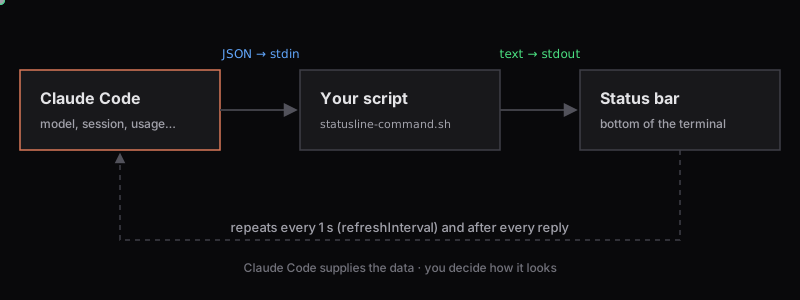
Claude Code supplies the data; the script decides how it looks.
The status line is an official Claude Code feature:
Claude Code runs your command and passes the session's details to it as JSON on stdin.
Your script prints one line of text (more lines are allowed; ANSI colours are fine).
Claude Code shows that output at the bottom of the terminal.
It runs locally and doesn't use API tokens. Claude Code re-runs it when a session starts, when a new assistant message arrives, after /compact, when the permission mode changes, when a refreshInterval timer elapses, and when a usage window reaches its reset time. Updates are batched over about 300 ms.
The fields this script reads look like this (trimmed; Claude Code sends more):
{
  "session_id": "1fb4ade2-…",
  "model": { "display_name": "Opus 5.5" },
  "workspace": { "current_dir": "/Users/you/project" },
  "cost": { "total_cost_usd": 6.44 },
  "context_window": { "used_percentage": 32 },
  "rate_limits": {
    "five_hour": { "used_percentage": 4, "resets_at": 1792371600 },
    "seven_day": { "used_percentage": 65, "resets_at": 1792890000 }
  }
}
resets_at is a Unix timestamp in seconds. A few fields come and go, and the script handles each one:
The 5-hour and weekly
rate_limitsare only sent to Pro and Max subscribers, only after the first response, and each window can be missing on its own. Claude Code drops a window once its reset time passes, so a bar can briefly disappear right after a reset.context_window.used_percentagecan be empty early in a session.The script reads every field with a fallback, so a missing field means a missing segment rather than an error.
Design decisions (and mistakes)
Colours that mean something
One colour for everything tells you nothing. Each bar changes colour at four points:
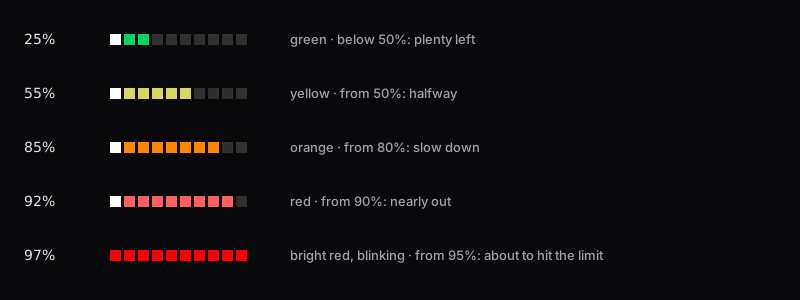
Each bar is coloured on its own, so a green context bar can sit next to a yellow weekly bar.
| Usage | Colour | Meaning |
|---|---|---|
| below 50% | green | Plenty left |
| 50–79% | yellow | Halfway |
| 80–89% | orange | Slow down |
| 90–94% | red | Nearly out |
| 95%+ | bright red, blinking | About to hit the limit |
The bar character matters more than you'd think
My first version used full blocks (█), which were far too chunky. The thin line ━ disappeared. Then I tried the lower ¾ block ▆, and it looked wrong without me knowing why: the bars seemed to sit lower than the text.
That's exactly what was happening. Block characters are anchored to the bottom of the character cell, so ▆ hangs below the baseline. A square ■ is centred in the cell and lines up with the letters.
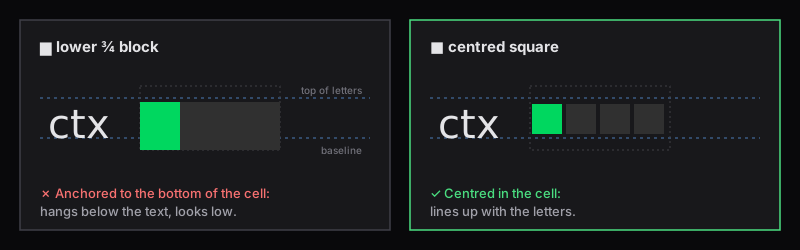
Same font, same size: the block sits low, the square lines up with the text.
I found this by rendering each candidate next to text in the same font and comparing them, rather than guessing. And one rule I'd keep: don't change your terminal font to make a status line look right. Change the characters instead.
Numbers that don't make the line jump
4% is narrower than 19%, so everything after it shifted sideways whenever a value crossed 10%. Padding every number to three characters (printf '%3s') keeps every separator in a fixed place.
Animation with one frame per second
A shell script can't animate on its own, but with refreshInterval: 1 each run is a frame. The script uses the current second (date +%s) to move a lighter "shine" square along each bar, pulse the leading square so even a one-square bar visibly moves, blink the whole bar from 95%, and pulse the ● dot.
Troubleshooting and limitations
| Problem | Fix |
|---|---|
| Nothing appears | Run jq .statusLine ~/.claude/settings.json to check the setting, then test the script by hand: `echo '{"model":{"display_name":"Test"}}' |
| Only branch, session and model show | Normal before the first reply; the other values arrive with it |
5h / wk never appear |
You're not on a Pro or Max plan in this session (for example an API key, Bedrock or Vertex), so Claude Code sends no plan-limit data |
| A bar vanishes right after a reset | Claude Code drops the expired window; it comes back with the next reply |
| Usage looks out of date | The numbers update with Claude Code's responses. If you've used Claude elsewhere, send a message here or run /usage |
| Squares look misaligned or gappy | Font-dependent. Swap ■ for ▬ or ▄ in bar(), and keep your font |
| Line too long for the window | Lower BAR_WIDTH, or remove the Session: segment |
Claude Code's built-in commands are still useful for anything the line doesn't show:
| Command | Shows |
|---|---|
/usage |
Session cost, plan usage limits and activity stats (/cost and /stats are aliases) |
/context |
A coloured grid of what's using the context window |
/status |
Version, model, account and connectivity |
/statusline |
Claude Code's own helper for setting up a status line |
Known limitations:
The
5handwkbars need a Pro or Max plan; the spend-limit data a Claude apps gateway can send isn't shown.Tested only on macOS with Apple Terminal. Linux should behave the same; Windows is untested.
How
■looks depends on your font.
Uninstall and recovery
There's no uninstall script, so here are the manual steps.
Easiest: run /statusline remove it inside Claude Code, which removes the statusLine setting for you. Then delete the script with rm ~/.claude/statusline-command.sh.
Or remove it by hand, keeping every other setting:
jq 'del(.statusLine)' ~/.claude/settings.json > /tmp/claude-settings.json \
  && mv /tmp/claude-settings.json ~/.claude/settings.json
rm ~/.claude/statusline-command.sh
Or restore your settings from the installer's backup:
ls ~/.claude/settings.json.bak-*            # pick the one from before the install
cp ~/.claude/settings.json.bak-<date-time> ~/.claude/settings.json
Restoring a backup also undoes any other settings changes you've made since, so the first option is usually better. If you had a status line script before, the installer kept it as ~/.claude/statusline-command.sh.bak-<date-time>; rename it back to bring it back. Once you're happy, you can delete the .bak- files.
FAQ
Does it make extra API requests or use tokens? No. The script only reads the data Claude Code passes to it and runs git locally. Claude Code states that the status line doesn't consume API tokens.
Does it work with an API key, Bedrock or Vertex? Mostly. The branch, session, model, context bar and estimated cost work. The 5h and wk bars don't appear, because Claude Code only sends plan-limit data to Pro and Max subscribers.
How often does it refresh? The script runs every second (refreshInterval: 1), and Claude Code also re-runs it after events such as each reply or a usage window resetting. The countdown and animation change every second; the usage and cost numbers change only when Claude Code receives new data.
What happens when data is unavailable? That segment is left out. The script never fills in or estimates a value.
How do I change the colours or bars? Edit ~/.claude/statusline-command.sh: BAR_WIDTH, the level() thresholds and colours, and the ■ character in bar(). See Configure and customize.
How do I turn it off? Run /statusline remove it, or delete the statusLine entry from ~/.claude/settings.json (see Uninstall and recovery). Claude Code goes back to its default bottom bar.
Wrap-up
Claude Code sends the data; a short bash script decides how it looks.
refreshInterval: 1keeps the countdown and animation live, while usage numbers update with each response.Pick characters that line up with your text, keep numbers fixed-width, and colour by meaning.
The full script is inside the installer, so you can read it before running anything. The official status line documentation lists every field Claude Code sends if you want to add your own segments. More posts are on my blog.
Originally published on siddarammetri.in.
Comments
Join the discussionNo comments yet. Be the first to comment.